Posts

It’s that time of year again; when we look back at the improvements we’ve made to strengthen the Sentry System and ensure we’re delivering the best possible experience for our customers.

Over the past 12 months, our focus has been on enhancing security, streamlining workflows, and making it easier for users to manage their compliance responsibilities. Many of these updates have been driven by customer feedback, and we’d like to thank everyone who continues to share suggestions, ideas, and experiences with us. Your feedback plays a vital role in shaping the future of Sentry.

One of the most significant updates this year has been our continued investment in account security. Multi-Factor Authentication (MFA) is now automatically enabled by default when users log into Sentry, helping organisations strengthen protection against unauthorised access and cyber threats. As security expectations continue to evolve, we wanted to make it easier for customers to benefit from an additional layer of protection without requiring manual configuration. We’ve also simplified the login journey, with users now entering their email address or using Single Sign-On (SSO) before progressing to password entry, creating a cleaner and more intuitive sign-in experience.

We’ve made several improvements to reporting and visibility across the system. Breach exports now include staff members involved, alongside additional reporting fields, while Group Summary reports can now display restricted items where an administrator is the owner or an authorised member.

Our DPIA tools have received a range of enhancements, including the addition of review dates, reminder notifications for overdue reviews, improved exports, and clearer page titles to make navigation easier. Supplier management has also been strengthened with new supplier categorisation options, contract end date reminders, and updated guidance content.

For audits and compliance activities, we’ve introduced location checks, refreshed the audit templates, and added new Subject Access Request fields to help manage requests requiring clarification.

We’ve continued to refine the learning experience too. Test Results now display the answer selected by the learner, and course questions and answers have been reviewed to remove ambiguity. Updated help content across the Login, Settings, and Supplier areas also makes finding support quicker and easier.

Every enhancement we make is designed to help you get the most from Sentry while supporting your data protection and compliance responsibilities. Thank you for being part of our journey this year.

Let us know if you’d like support with any of these features, or if you have ideas for what we should tackle next. Here’s to another year of continuous improvement, collaboration, and helping you stay compliant with confidence.

The Sentry Team

It’s that time of year again; when we pull back the curtain and let you in on everything we’ve been working on to make your Sentry System stronger, smarter, and even more aligned with your GDPR compliance needs.

This past year, our focus has been on refining the tools that matter most to you: improving visibility, enhancing transparency, and making privacy management more intuitive at every level.

We introduced several quiet but powerful updates to strengthen your ability to demonstrate compliance. Our Privacy Notice is now displayed right on the login screen for better accessibility. You can now enable audit log notifications that include entry numbers for easier identification and review. We’ve also expanded the SAR export reports to provide a more complete picture of each request you receive, because detail matters.

One of the most exciting updates? Our Audit module has been completely re-vamped. This redesigned feature now empowers you to assess the health status of your school’s GDPR compliance with greater clarity and confidence. Whether you’re reviewing internal practices or preparing for external scrutiny, the new Audit module gives you a comprehensive overview of where you stand and where you can improve.

Have you spotted the new Governor Training Module? Or checked out Version 6.0 of the Sentry System Manual yet?

On the administrative side, we’ve made big strides in usability. A new admin feature shows MFA and Google login activity across all users, helping you keep accounts secure at a glance. System emails, like welcome invitations, are now more helpful, clearly showing which system they relate to. And with the addition of new suppliers and updated retention periods, your back-end tools are more aligned with your processes than ever before.

We’ve also made visual and reporting improvements. Graphs are now easier to read, with updated colour schemes, and complaint data is now presented in your Key Statistics and Group Summary views. Speaking of complaints, a new escalation tab helps record and identify escalated issues, so you can track progression and outcomes when it matters most.

Your feedback, questions, and ideas help shape every improvement we make. Thank you for trusting Sentry to support your GDPR journey and data protection responsibilities.

Let us know if you’d like support with any of these features, or if you have ideas for what we should tackle next.

Here’s to another year of helping you stay compliant, stay confident, and stay in control.

—

The Sentry Team

12 Months, 30+ Enhancements, and One Seriously Upgraded System – Here’s Sentry’s Year in Review

Over the past year, we’ve been busy building, refining, and supercharging your system with over 30 significant improvements, each one designed to make your experience more powerful, more intuitive, and, dare we say, a little more enjoyable. Whether you’ve spotted the subtle tweaks or just logged in one day to find everything working a bit more beautifully, the last 12 months have been all about taking your feedback and transforming it into action.

Here are some of the headline acts from this year’s development setlist:

‘Key Statistics’ Feature – Consider this your new go-to dashboard. Real-time, at-a-glance insights that turn data into insightful graphs without the spreadsheet headache.

New Audit Log – Ever wondered who changed what and when? Wonder no more. Our new audit log feature provides a crystal-clear trail of new entries, so you can track activity like a pro.

Multi-Factor Authentication (MFA) – Because security shouldn’t be optional. You can now enable MFA for that extra layer of protection. Peace of mind, powered by best practice.

System User Manual Integration – The latest guidance is now right where you need it: inside the system. No more digging through emails or outdated PDFs. If it’s changed, you’ll know it.

System-Wide Refinements – We’ve fine-tuned just about everything: updated reporting options, smarter selection fields, improved user management tools, and enhancements across every corner of the system. Cleaner layouts, better flows, and more “oh-that’s-useful” moments.

These updates are more than just tweaks; they’re part of our ongoing commitment to giving you a system that grows with your needs and evolves with the times.

To those of you who’ve sent feedback, asked the tough questions, or pointed out the things that could be even better – thank you. You’ve helped shape every one of these updates, and we’re excited for what’s coming next.

So here’s to progress, partnership, and platforms that just keep getting better.

Over the past 12 months, we’ve been busy behind the scenes, rolling out exciting new features, fine-tuning your favourite tools, and delivering enhancements that make your day-to-day work a little bit smoother (and a lot more efficient). Whether it’s a shiny new module or subtle improvements to existing systems, we’ve been listening to your feedback and turning it into action.

So, what’s new in our tech treasure trove?

A brand-new User Manual to guide you through every step, An incredible, new, Complaints module to streamline your processes, New data fields in the reporting of SARs, Breaches, and FOIs to give you even more control and clarity. Oh, and if you’ve ever wished for a cleaner, more intuitive layout you’ll love the updated Group Summary section.

Plus, for those “I need help right now” moments, we’ve made sure you’re covered with fully comprehensive help sections that are always just a click away.

Intrigued? Want to know more?

Existing customers can contact their dedicated Customer Success Manager for more information on all of the latest updates, or even a “show and tell”.

If you’re new to Sentry, why not book a Demo of our system. Its quick and simple, just click on “book a demo” on the homepage and choose a date and time that suits you.

Documenting Data Breaches

Why paper and spreadsheets may not be enough…

  • A Breach Scenario

You’ve experienced a breach where information was sent to the wrong person. During the investigation it became clear that the person whose data was breached was aware of it happening. You took the actions that seemed appropriate and decided that it wasn’t necessary to report to the Information Commissioner’s Office (ICO). Case closed.

This is a situation that you might recognise and it’s a pattern that many breaches follow.

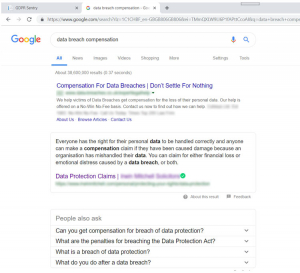
If you type ‘data breach’ into a search engine like Google, high in the list of predicted searches is ‘Data breach compensation’. On the pages this search returns you’ll find law firms letting people know about their right to compensation. This compensation can cover both direct losses and emotional distress. It’s very hard to demonstrate that someone didn’t experience distress. You’ll also see that some firms are focused on ‘public authorities’ including schools for raising these claims.

If someone makes a claim it can be strengthened by making a complaint to the ICO. This is quite a simple process although it may take some time. If you’ve provided even fairly basic information to the data subject about what has happened this may be enough for the ICO to make a determination. The first you hear about it may be when you’re informed of the decision.

  • Managing the details

It would be great to think that if you can prevent breaches from ever happening then the problem would be solved. While a breach free world would be excellent it’s not the real world, breaches do happen. Of course, it’s important to put measures in place to reduce the risks of breaches occurring, but it’s also important to pay attention to what happens when they do.

You can have the best measures in place, but if you can’t demonstrate them then they won’t help if a complaint arises.

  • Legal requirement

The time limit for a claim is six years and breach records should therefore be retained for this period of time.

Paper and spreadsheets

There is a risk that using paper and spreadsheets may simply not provide the required level of documentation and could significantly increase the level of risk from a potential claim down the line.

System – Keep track of your actions

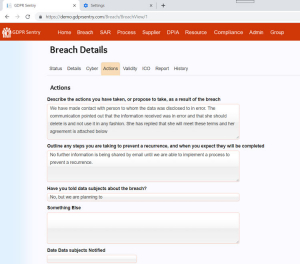
By using a system, you can fully document the action that you’ve taken around a breach incident including communicating with data subjects. You can create a timeline, add notes and attachments so that all the information is to hand, whenever you need it.

This is where the Sentry system can help